How position sizing works
Most traders decide how much to buy by feel: "I'll put in $2,000". The problem is that the loss then depends on where the price happens to go, not on a decision you made.
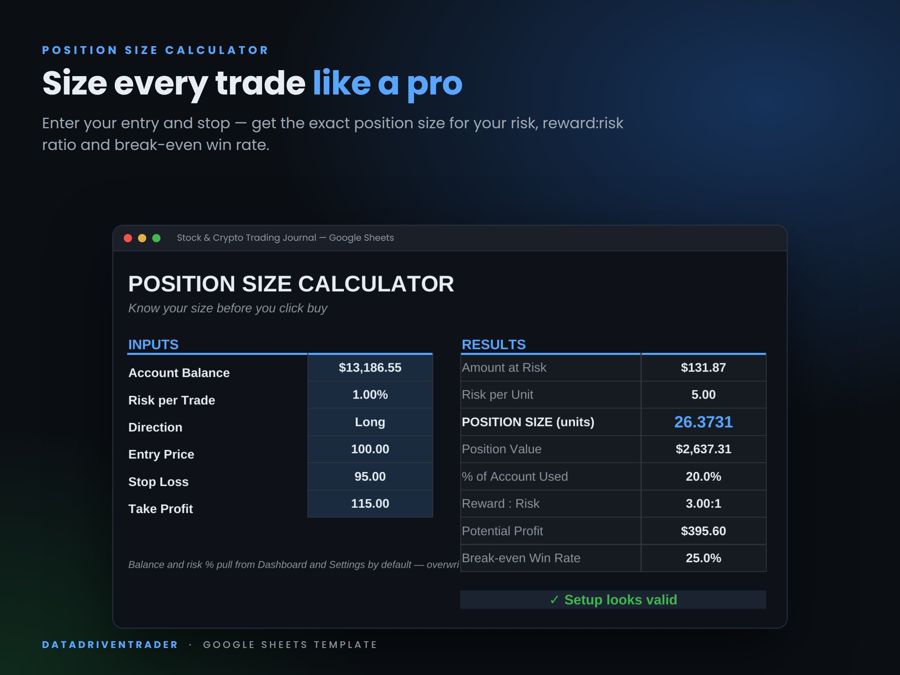
Position sizing flips that around. First you decide how much you are willing to lose if the trade goes wrong, usually 0.5% to 2% of your account. Then you place your stop loss where your idea is proven wrong. The position size is whatever makes those two numbers match.
The formula
Worked example
Your account is $10,000 and you risk 1% per trade. You want to buy Bitcoin at $60,000 with a stop at $58,500 and a target at $64,500.
- Risk amount: $10,000 × 1% = $100
- Stop distance: $60,000 − $58,500 = $1,500 (2.5%)
- Position size: $100 ÷ $1,500 = 0.0667 BTC (about $4,000)
- Reward:risk: $4,500 ÷ $1,500 = 3 : 1, so the potential profit is $300
- Break-even win rate: 1 ÷ (1 + 3) = 25%
Notice that you put $4,000 into the trade, but you only risk $100. That is the difference between position size and risk.
Two ways to use this calculator
1. Find position size
Use this when you already know where your stop loss belongs on the chart. You set the most you are willing to lose, and the calculator tells you how big the position should be.
2. Find stop loss & take profit
Use this when you always put in a set amount, like $500 with 5x leverage. You set how much of your account you are willing to lose and want to make, and the calculator tells you the exact stop loss and take profit prices.
Account $10,000. You put in $500 with 5x leverage and go long at $60,000. Max loss 1% ($100), profit target 3% ($300).
- Position: $500 × 5 = $2,500, which is 0.0417 BTC
- Stop distance: $100 ÷ 0.0417 = $2,400, so the stop loss is at $57,600 (−4%)
- Take profit distance: $300 ÷ 0.0417 = $7,200, so the take profit is at $67,200 (+12%)
- Estimated liquidation: about $48,300, safely below the stop
How leverage fits in
Leverage does not change how much you lose at your stop loss. A $4,000 position that drops 2.5% loses $100 whether you paid for it in full or opened it with $400 at 10x. What leverage changes is:
- Margin required – how much of your own money is locked in the trade (position value ÷ leverage).
- Liquidation price – the price where the exchange closes the position and you lose the margin. Higher leverage puts it closer to your entry.
| Leverage | Approx. liquidation (long) |
|---|---|
| 2x | about −49.5% |
| 5x | about −19.5% |
| 10x | about −9.5% |
| 25x | about −3.5% |
| 50x | about −1.5% |
The most important check: your liquidation price must be further away than your stop loss. If it is closer, the exchange closes you out first and you lose the whole margin. The calculator warns you when that happens. Liquidation prices here are estimates for isolated margin with a 0.5% maintenance margin. Your exchange may show a slightly different number. To compare every leverage level, use the liquidation price calculator.
What the numbers tell you
Reward : risk
How much you stand to make for every dollar you risk. Below 1:1 you need to win more than half of your trades just to break even, which is hard to keep up over time.
Break-even win rate
The share of trades you must win to not lose money with this setup (before fees). If your journal shows a 40% win rate, any setup with a break-even win rate above 40% is losing you money on average.
| Reward : risk | Break-even win rate |
|---|---|
| 1 : 1 | 50.0% |
| 1.5 : 1 | 40.0% |
| 2 : 1 | 33.3% |
| 3 : 1 | 25.0% |
| 4 : 1 | 20.0% |
% of account as margin
How much of your balance is locked in this trade. If it is above 100%, the position is bigger than your account and you need leverage or a smaller trade.
Frequently asked questions
How do I calculate position size?
Multiply your account balance by the percentage you want to risk. Divide that amount by the distance between your entry and your stop loss. The result is how many coins or shares to buy.
What is the 1% rule in trading?
You never lose more than 1% of your account on one trade. It does not mean you only put 1% of your money in a trade. It means you size the trade so that hitting your stop costs 1%.
Can I enter my stop loss as a percent?
Yes. Type the price or the percent for both stop loss and take profit. The other value fills in automatically, and it updates if you change the entry price or direction.
Does leverage change my position size?
No. Position size comes from your risk and your stop distance. Leverage only changes how much margin you need to open that position, and higher leverage moves your liquidation price closer to your entry.
How do I find my stop loss from my margin and leverage?
Switch to "Find stop loss & take profit". Enter the money you put in, the leverage and the most you are willing to lose. The calculator multiplies margin by leverage to get the position, then works out how far the price can move before you hit that loss.
What if my liquidation price is before my stop loss?
Then the exchange closes your position at liquidation before your stop can trigger, and you lose the whole margin. Lower the leverage or move the stop closer to your entry.
Does it work for short trades?
Yes. Choose Short in the direction menu. Your stop loss then goes above the entry and your take profit below it. You can type the percent and the calculator works out the prices for you.
Are fees and slippage included?
No. In fast markets your stop can fill worse than the price you set. Many traders risk a little less than their maximum to leave room for fees and slippage.
Related calculators
This calculator is an educational tool. Results depend on the numbers you enter and do not include fees, slippage or funding costs. Nothing on this site is financial advice.